Showing posts with label shsh blobs. Show all posts

Saturday, 18 September 2010

That Syncing feeling. Downgrade from 4.1 iPhone 3G


If you read the previous post you'll realise that I have had a disastrous bash at jailbreaking iOS4.1 for my 3G using Redsn0w. What follows are my attempts to recover.

Plan C (put the sim into my HTC) might be my best option but I want to try something first. Plan D was to downgrade to 3.2 but I don't know how to do that so here's plan E

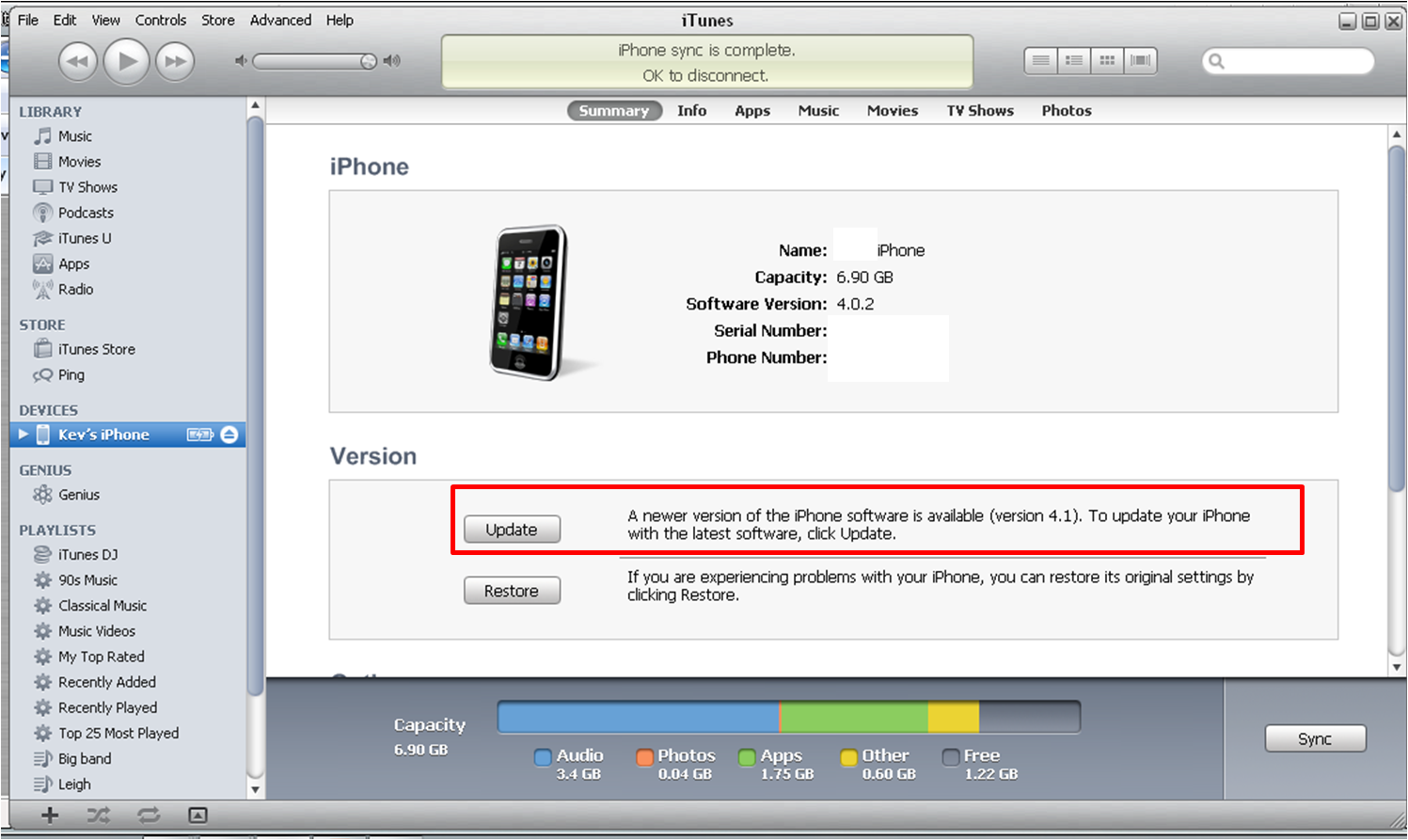
Plan E I should be able to restore my phone to iOS 4.02 which is where I was before I started this. Read all of this before you start. Follow the instructions here
Downgrade from4.1. To confirm, to go into DFU mode hold the power and home buttons for ten seconds, ignore the 'slide to power off prompt' then let go of the power button whilst continuing to hold the home button till iTunes alerts you that it has detected a phone in recovery mode. Say 'OK' to that prompt and then follow the instructions from the link. If like me you have a 3g then you should be able to skip steps 3 and 7.

The step by step doesn't really prepare you for what happens when running tiny umbrella. Ignore a couple of false starts where your phone tells you to slide to use emergency only. TOUCH NOTHING. It will eventually say 'iPhone is activated'. iTunes will prompt you to run your last restore. Do this. It's the longest sync in history but I'm hoping it works. It does after all have around 50 apps, 500 songs and 70 pics to recover plus all contacts emails etc so be patient.

You now have an iPhone on iOS 4.02. You are going to need to run Redsn0w like in step five of the previous post. Hope it works better this time. Again browse to iOS4 final version even though you're restored to 4.02 and follow the instructions to let it do its thing.

I now need to add installous via cydia to restore my jailbroken apps (like tomtom). OH OH!!!! Clicked on Cydia. It said it was reorganizing and would shut down when finished. It did this but then , when the phone started up cydia was gone and my phone, notes and SMS icons were blank.

Running redsn0w again. Holy shit it looks even worse now. Loads of white icons. Cydia is there but it is also white. I'm going to try running it. Wish me luck.


Now we're getting somewhere. Cydia asked me to upgrade. I chose update all. It restarted and I now have icons.

I'm adding cydia.hackulo.us and apt.macosmovil.com repos via cydia. (Manage Sources)

I'm adding openSSH to packages (manage packages).This allows you to add things directly to your phone. I've saved my theme from before so adding it directly to the folder structure will save me hours once I have added winterboard from Cydia.

I'm adding SBSettings, SBSettings Toggle, My3G, Navigate from maps, Remove background, iblank and auto3g. There are others but remember that we do expect a 4.1 jailbreak soon so there's no point going nuts.

Then I had to go into the phone settings to change my folder icons and to remove the background shadow from the buttons.


OK so it has taken all day to go from start to finish and, thing is, the finish looks exactly like the start. You may think it was a complete waste of time. My wife does. I don't. I wouldn't recommend it though.

It's very early to tell but I think the phone may be a bit more responsive. It is possible that I've updated the phones base band and that that has made some sort of difference.

For the moment, I am now on base band 05.14.02. That's the base band for 4.1. What that means is that I can't presently unlock the phone but for me that's not an issue.

iTunes 10 freezes for about 30 seconds every time I go to sync. This may be some sort of conflict with having the 4.1 base band and the 4.02 operating system but it gets past it if you wait it out so no issue there. Syncing my phone now shows six steps rather than five as previous and I still sometimes get told that sync can't load provider data.

Guess I'll just wait for the official jailbreak now.

Update
Wouldn't you know it. Within 24 hours of my debacle someone finds a jailbreak solution although not the official one. Go to SpiritJB.ORG where you'll find that someone has made a jailbroken ipsw file for 4.1 for the 3g. So does that mean I'm now jailbroken on 4.1? No. Couldn't face the hassle so soon after Saturday plus, my phone is working really well at the moment. I can only assume it's got something to do with having the new baseband from 4.1 with the functionality of 4.02 and the redsnow jailbreak but the phone is working better than it ever has.

I'll wait a while and see what the official jailbreaks bring. Sn0wbreeze 2.0 from ih8sn0w is rumoured to come out this Wednesday and will break everything except the iphone 4. Greenpois0n is still the most talked about yet illusive of all the jailbreaks using pod2g's SHAtter exploit. Pod2g has left the chronic dev-team today but says the jailbreak will go ahead. Interestingly it was pod2g that I quoted last week as saying the jailbreak would come out on Saturday. It was also pod2g that found the jailbreak prior to the release of iOS4.1. I suspect he or she may have left after getting impatient with the delays of their colleagues who are testing the break and creating the software. To be fair though I wouldn't launch something half arsed. For all people are impatient that's nothing compared to how they'd be if a jailbreak broke their phones. That would play directly in to apples hands.

So that's you up to date.

Update 2

21/09/2010 Looks like a new version of Redsn0w has been released. Not only can it break 4.1 for the iphone 3g and ipod touch 2g but it's rumoured that it can do the beta version of 4.2. If you read my previous post you'll get decent instructions on using it though I'd check at Redmond Pie just to make sure because you now have to pint it at iOS4.1 instead of 4. The new Redsn0w is only available for Mac at the moment but I'd imagine it will be avilable for windows within the week. Sn0wbreeze is rumoured to hit tomorrow and I suspect greenpois0n will pull out all the stops to do the same before it becomes pointless. It's like a soap opera this. You could get hooked. My wee 3g is still going like lightening since Saturdays debacle. I'd almost (but not quite) recomend the pain I went through for the performance improvement.

Just incase any gurus on the iPhone ever see this page. Quick question. If I updated, jailbroke and then added all my custom apps and winterboard theme, could I then somehow save that as an ispw file? It's just that with my 3G working well right now I'm a bit shy of jailbreaking however, I know that each new release also brings new features. If I could create a custom ispw file unique to my phone then I could jailbreak with confidence knowing that I could always restore if things went wrong. Hmmmmm

More news as it comes.

T

Jailbroken 3g on IOS 4.1? To break or not to break?


What follows details exactly how I tried and failed to jailbreak and upgrade to iOS 4.1 on my 3g using Redsn0w. As you will see I had half an idea that it wouldn't work but felt that I had to try. Unlike other sites I also detail exactly how to undo everything and get back to where you started. Why didn't I just say 'Don't do it?'. I didn't listen when others said this to me so why should I expect you to?

Read everything BEFORE doing anything. Don't blame me if this doesn't work for you. I'm desperate so I'm having a go. If any of the stuff below means nothing to you or if your iPhone means everything to you stop reading now.

Ok here goes. Let's break my phone.....

You might say 'Why break a perfectly good phone?'. I would then say 'it's not a perfectly good phone'. The marraige of iPhone 3g and jailbreaking has been legendary and allowed this aging piece of kit to almost rival it's big brothers the 3GS and 4. When iOS4 came out though small cracks began to appear. A jailbroken 3g got all the bows and bells of iOS4 (Multitasking etc) but, jailbroken or not, started to have massive performance issues. If a phone call came through whilst safari was open the whole thing crashed and needed re-booted. Face Book only managed to open about 1/3 of the time and even SMS wasn't exactly solid. Location services could freeze everything up. It seems to me that the phone just didn't manage it's memory well enough. It would sacrifice everything into one task and then just close down.

These problems came to a head on a journey down south and I found myself in the position of depending on the phone and knowing that it was going to let me down. My old HTC wasn't as fancy as the iphone but it was 100% reliable. I love gadgets but, unlike a lot of geeks, I like my gadgets to solve a problem. If they don't do that then they are useless.

Apple became aware of the issue with reliability on the iPhone 3g. Had it just been jailbreakers they would have ignored it but the fact was that ordinary users were complaining that their phones were completely useless. As a result iOS 4.1 was introduced. There were a couple of new things with 4.1 (see previous posts) but the biggy for me was that it would resolve performance issues for the 3G. My only issue was that my phone is heavily customised and uses many jailbroken apps. I guess I want it all. A jailbroken iPhone that works my way as well as the performance that Apple designed it to produce. So I want to update to 4.1 and jailbreak it. 4.1 has been out for over a week now and, despite claiming to have jailbroken it prior to release, no official working jailbreak has been forthcoming.

Since the current version of Redsn0w reportedly has issues (breaks phone app, Cydia doesn’t work) jailbreaking iPhone 3G on iOS 4.1 (final version) I am going to first try something call the Pwnage tool. This will be plan A. My only issues with trying to break the phone this way are, I've never tried it before and I think it maybe only works for Mac. Whatever, I'll give it a try and then, if it doesn't work, I'll try Redsn0w (Plan B) as I felt that the instructions for installing were wrong on some of the other sites that I read and that may be why they've had issues. Finally plan C involves putting the sim in my HTC and waiting for the SHAtter exploit to come out on greenpois0n. I have to do something. If iOS 4.1 doesn't deliver the performance improvement required then I give up on the iPhone. If it does deliver the improvement then I may not upgrade to 4.2 in November or beyond as I would be quite happy with what I presently have provided it works properly. I have even considered reverting to 3.2 as it seemed to be optomised for the 3g. Maybe that's plan D. The instructions for upgrading using Pwnage were found here:
jailbreak-iphone-3g-ios-4.1-pwnagetool-guide. I have used Redmond Pie several times in the past and they have proved very reliable.

Plan A Download iOS 4.1 PwnageTool Bundle for iPhone 3G
Ok so plan A is a complete non starter for those of us working on windows. There is a way to emulate a mac on windows but life is too short.

Plan B This is the plan that I thought might work from the start but I put off trying till I waited for confirmation. When the confirmation came it came with all sorts of user issues related to the the phone app not working, the wifi not working and Cydia not working. So you could end up with an iPhone that basically doesn't work at any level. I'm hoping that if the worst happens then at least the phone can just be restored to iOS 4.1 with no jailbreak but I can't swear to this being possible. Now I've already mentioned on here that I've seen instructions on doing this that I don't like. I've wondered if this may be why people have had problems.

First: I'm downloading something called Tinyumbrella.
Tiny Umbrella. This saves something called shsh blobs. I'm sure you could google this and get an explanation of what they are. I however have no idea. What I do know is that if you completely screw up then, provided you have run this software and allowed it to save some files, you can downgrade back to an older working version of iOS. Trust me. Do this.

Second: Here in the UK several mobile phone providers supply iPhones so we're not as hung up on unlocking (changing carrier). This is not the story in most countries however. If you want to jailbreak 4.1 and unlock the phone once it's done then follow these instructions BEFORE you do anything:
Upgrade to iOS4.1 without upgrading baseband


Third: I'm opening Cydia on my phone, checking that it has updated and shows the stored shsh blobs on there as well. You also need to have a final version of iOS 4 saved on your PC(THIS IS NOT A TYPO. I DID SAY iOS4 and not 4.1 which is probably what you expected). You can get a copy here:iOS 4 Download

Forth: Take a deep breath and be brave....Connect your phone and allow it to sync (I'm a bit worried about this because I've been getting the following error since I upgraded to iTunes 10). Stay connected to iTunes and upgrade to iOS4.1. I'm just checking one last time that greenpois0n hasn't suddenly become available.

Cross everything that this works because this is a sort of point of no return. At least my 3G should respond better but it could be the end of my jailbreak days. Keep reading....Fifth: The instructions that I am going to follow are the ones published here:
jailbreak-iphone-4.1-ios-iphone-3g-ipod-touch-guide.
I am going to follow this guide from STEP 3 as it was written before iOS4.1 was officially released. Keep everything crossed still. When this is over you'll know for certain wheteher it worked or whether I just made my phone useless.

Exciting......

If you screw up the bit about holding the power button for three seconds, then the power and home for about twenty and then the home button for about thirty don't panic just start again. You haven't done any harm. (At least not yet)

DO NOT TOUCH YOU'R PHONE WHILE IT'S DOING ITS THING. You'll know when it's ready. It will reboot to the apple logo. The boot time will be longer than usual. DO NOT TOUCH.

Might as well set your expectations at this point. When you'r phone restarts it may: lack a phone icon, fail to get wifi (make sure that you don't just need to pair with your modem again)and cydia may be a blank icon.

Here goes. Switching on.

The worst appears to have happened. No phone icon. No wifi and cydia is blanK. I do seem to have SMS although I haven't tried sending anything and I have 3g. I'm not panicing yet (well ok I am a bit but trying to remain level headed).

I have icons. Even for the jaibroken apps although, at the moment they don't work. I clicked the cydia blank icon and it told me that I needed to join a wifi network. I entered my wifi code and put my router into pairing mode. The wifi icon appeared but cydia just closed. I tried to open it again. It closed. I tried again and it opened but with a new apple logo. It told me that I had essential upgrades which I accepted. Seemed to freeze but I'm not going to touch it till I'm sure. I can't screenprint what's happening as I need a jailbreak app to do that I'm afraid. It's taken ages so I'm re-booting the phone. I'm clicking on 'Complete Upgrade' again. Again I'm having to crash it out.

I'm going to try syncing with iTunes to see if that makes a blind bit of difference. I notice that whilst iTunes is syncing my phone screen is blank. This is unusual you would normally have a screen to say it was syncing. This does not seem good. It's taking an abnormally long time although it does seem to be trying to install some jailbreak apps (tomtom etc). At the end of the sync I got all sorts of errors but my jailbroken apps now seem to work.

Although I'm showing a wifi connection I just tried safari and it aint opening any web pages. Looks like this seriously doesn't work. I did dial my phone and it did recognise an incoming call. Call me old fashioned but I'd also like to make calls. Sorry folks but at least I tried.


Looks like I'm going to have to find a way to restore. Look at my next post to see what happens....

Don't try this at home....

T


blogger templates