Showing posts with label Redsn0w. Show all posts

Sunday, 10 October 2010

Geek Week

OK so first things first. Sorry for not letting everybody know how it went last week. So here's a quick recap. Shit happened big time to my desktop PC. Last weeks blog came from an incredibly Pissed off TQ working on the laptop. I was facing potentially hours of work and, what's worse, I had no idea why. My PC had just shut down and was refusing to recover.

The good news. I settled in for a marathon session. This required lack of cleanliness and old comfortable clothes. It helps when you're working with PCs if you can grow stubble as you work (sorry ladies but it's true). My first start had enough oomph to get into windows once I'd cancelled disk checking. First task therefore was to basically steal as much as I could copy before the blue screen could catch me. With every file my mood lifted. I may lose the PC but I was recovering the files.

Next, after several failed re-starts, was to try and defrag a drive that looked like it only ever surfed the net for Viagra. I honestly can't ever remember a defrag taking longer. When it finished the drive still looked rough so I started again. The PC seemed to be getting more stable plus I could take risks because I had the important files backed up. Yep it took two days and I have no idea why it happened but I'm back on the desktop and it's working.

It was just time consuming but, file by file, cluster by cluster, I recovered to the point where I had a stable PC. I'm still a bit disturbed because I can't find an event that caused this one. How do I know it won't just happen again? I'll just need to keep my fingers crossed because there's stuff higher up the list than a new PC. The dishwasher is broke for instance which is much more of a crisis because the temporary replacement is me.


10 Cheers for Binary

Ten past ten on Sunday should really be a big date for geeks and binary enthusiasts the world over. It will be 10:10 10/10/10. Actually my first phrase can't be right. There's no such word as should in the world of binary. It either is or it isn't.

I'm a Photo shop Pro
One way or another it's been a really geeky week. There was the PC to fix. At work I was trying to help someone use some HTML tags to add interest to an online presentation that they were putting together. Now I don't really understand much about HTML myself and the little I do know has been kind of self taught from editing my blog so I printed some stuff off from the net. It was from this that I heard about meta tags. Meta tags apparently help google to list your blog. Who knew? So I've added a couple of rows to the Head section of my blog. I'll check google analytics periodically and see if it makes any difference before I bore everybody with a how to.

I also had a couple of things to do in photo shop. Now I've had a version of this kicking about on my PC for ages but I actually find it to be one of the more difficult image editing software's to learn so I've kind of avoided it even though I know that it's supposed to be the best. The thing is I had a couple of things I wanted to do that the easier image editing stuff wouldn't do so I gritted my teeth and went in to photo shop.

I always make my wife's birthday card you see. It's not that I'm too tight to buy a card, honest, it's just that you want to do something personal. It started about 13 years ago when we got married (and coincidentally got our first PC)and I've made a card for every birthday, anniversary and Christmas since. My wife reads this blog so I'm not going to give away the details of the card however: I had found an image that would have been perfect except for two things. It was completely the wrong colour and it had stuff in the background that I wanted to remove. This is the sort of thing that photo shop was invented for and I have to say, after much googling and perhaps the odd swear word, it worked perfectly. Go photo shop. Actually I'm kicking myself because I did one image perfectly in photoshop and then (time was against me) I did another very quickly in PowerPoint and the difference shows.

Phone Home

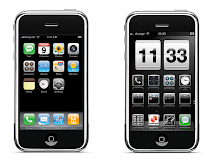
So when I was working with photo shop I had an idea for the phone. Whilst searching for images for the wife's card I came across a picture of an old fashioned British red phone box. Wouldn't it be cool to use that as the icon for my phone? But then I'd need to redo the other icons on the dock at the bottom. A post box for SMS, a map for Tomtom but what about settings? Maybe the IPSW icon that apple use. I lifted and tidied the images using my new found photo shop skills and I think the results are pretty good (if a little bizarre looking). I have an idea to take this further but I haven't completely made up my mind yet. What do you think?

It's Raining It's Sn0wing the Whole thing is B0ring

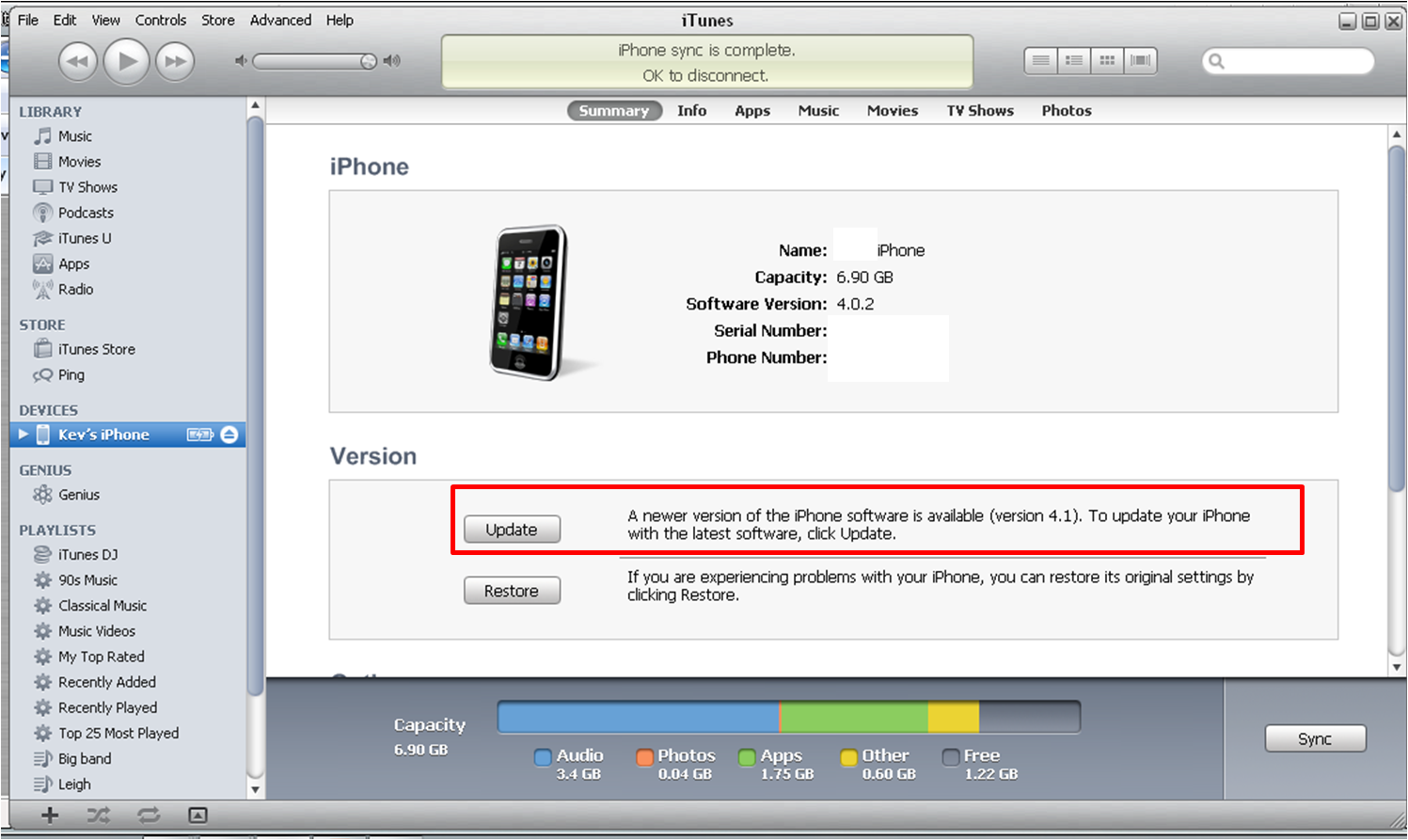
My iPhone has now been upgraded to iOS 4.1. I finally managed it on Friday when Redsn0w released a windows version. It worked flawlessly and there were no scary moments except when cydia came up with a white icon. I clicked it and it did stuff and before you could say 'screw this I'm going back to HTC' it was fixed. I do have a slight concern that when I click the remove background program in SBSettings it crashes the phone but otherwise it all works.

Thank god it did work because the whole Jail breaking scene has gone off its head this week. I love the fact that these geeks help us to mess with our iPhones but they truly are a bunch of geeky divas. Greenpois0n was to be the jailbreak to end all jailbreaks. An exploit called Shatter was discovered before iOS4 had even been released and it was to be the first to break all models of phone for life. The problem is that they didn't release it. They kept telling everybody how good it would be and showing videos of how it broke various devices but they never released it. Up until this week that is.

This week they announced that it would be released at ten past ten on Sunday. 10:10 10/10/10. The bad news however was that it wouldn't jailbreak the bulk of our iPhones. Only the iPhone four and the iPad. Bummer. Given that Friday saw the release of Redsn0w for windows and that Sn0wbreeze should work on the 3gS I think most of us are actually already able to jailbreak our phones anyway but it was none the less disappointing given that we've been waiting for more than a month.

Geohotz Rains on Chronic Devs Parade
Now came the bit that no-one expected. Ahead of the greenpois0n disappointing release came news from someone who claimed that they had bowed out of the whole jail breaking scene. George Hotz released a jailbreak one day ahead of greenpois0n that worked on most types of idevice. Limerain instantly became the jailbreak of choice and no-one even wanted greenpois0n any more. So much so that greenpois0n hasn't released. They say they are keeping it to jailbreak 4.2 when it comes out next month. I for one won't hold my breath.

So there you go. What a week to be a geek.

More next week

T


Monday, 27 September 2010

Sn0w storm comming, Frosty reception for Sn0wbreeze 2.02

Well last Wednesday night I must have been one of the first to download the brand new Sn0wbreeze jailbreak. It was due for 2am but I had it on my PC the moment it came out about 1.10

But I didn't have it on my phone. My phone has worked very well since my screw up last week and as a result I've not been quite so desperate to screw it up again. Also I was away for the weekend so I didn't want to risk my phone not working. As a result I did not install the new jailbreak.

By the time I got home today the jailbreak has gone through another two incarnations. That means it wasn't right at the start. I've now downloaded the latest and am just trying it. I have my doubts but, I'm off tomorrow so if the worst happens I have a day to fix it.

I have an iPhone 3g. I'm attempting to break it with sn0wbreeze version 2.02. I've 'cooked' the ipsw and am now running a restore. I've already had one error and am now getting that sinking feeling again. This doesn't look hopeful. I followed the instructions at Redmond pie but I'm getting a 1604 error. I'm using Tiny umbrella to kick my device out of recovery as it seems to be locked at the moment.

Fortunately I don't appear to have done any damage but I've not upgraded either. I'm a bit surprised. I genuinely thought this would work. I'll try again but it looks like we may have to wait for greenpois0n after all.

Try 2. This time I made sure the phone was in recovery mode before selecting restore. This is achieved by holding the home and on/off buttons simultaneously till the screen goes blank (ignore the 'switch off message) then letting go of the on/off whilst continuing to hold the home button until iTunes says that it recognises a phone i recovery mode. I then held down shift and clicked the 'restore' button in itunes and browsed to desktop and the new ipsw. I'm watching itunes just now but it ain't doing much.

Oops. This time it really doesn't look good. iTunes has just kicked the phone out and it wont switch on or anything. I unplugged then plugged back in and it said it recognised a phone in recovery mode so I browsed to the ipsw again. Fingers crossed... Nope. I've had error 1601 and now error 21 after running something called iReb. The good news is that when I come out of recovery mode using Tiny Umbrella my phone is undamaged. Just not upgraded. This is not the end of the world. To date: I can't use PWNAGE because I don't have a mac. The old version of Redsn0w (my preferred option) doesn't work and the new version is Mac only at the moment. Sn0wbreeze looks like working (it creates a new ipsw file) but wont restore to 4.1 so I'm still jailbroken on 4.02 with the 4.1 bootrom. The phone works better than ever but doesn't seem keen to upgrade to 4.1. Looks like I'm still waiting for greenpois0n.

Watch this space...
T

Saturday, 18 September 2010

That Syncing feeling. Downgrade from 4.1 iPhone 3G


If you read the previous post you'll realise that I have had a disastrous bash at jailbreaking iOS4.1 for my 3G using Redsn0w. What follows are my attempts to recover.

Plan C (put the sim into my HTC) might be my best option but I want to try something first. Plan D was to downgrade to 3.2 but I don't know how to do that so here's plan E

Plan E I should be able to restore my phone to iOS 4.02 which is where I was before I started this. Read all of this before you start. Follow the instructions here
Downgrade from4.1. To confirm, to go into DFU mode hold the power and home buttons for ten seconds, ignore the 'slide to power off prompt' then let go of the power button whilst continuing to hold the home button till iTunes alerts you that it has detected a phone in recovery mode. Say 'OK' to that prompt and then follow the instructions from the link. If like me you have a 3g then you should be able to skip steps 3 and 7.

The step by step doesn't really prepare you for what happens when running tiny umbrella. Ignore a couple of false starts where your phone tells you to slide to use emergency only. TOUCH NOTHING. It will eventually say 'iPhone is activated'. iTunes will prompt you to run your last restore. Do this. It's the longest sync in history but I'm hoping it works. It does after all have around 50 apps, 500 songs and 70 pics to recover plus all contacts emails etc so be patient.

You now have an iPhone on iOS 4.02. You are going to need to run Redsn0w like in step five of the previous post. Hope it works better this time. Again browse to iOS4 final version even though you're restored to 4.02 and follow the instructions to let it do its thing.

I now need to add installous via cydia to restore my jailbroken apps (like tomtom). OH OH!!!! Clicked on Cydia. It said it was reorganizing and would shut down when finished. It did this but then , when the phone started up cydia was gone and my phone, notes and SMS icons were blank.

Running redsn0w again. Holy shit it looks even worse now. Loads of white icons. Cydia is there but it is also white. I'm going to try running it. Wish me luck.


Now we're getting somewhere. Cydia asked me to upgrade. I chose update all. It restarted and I now have icons.

I'm adding cydia.hackulo.us and apt.macosmovil.com repos via cydia. (Manage Sources)

I'm adding openSSH to packages (manage packages).This allows you to add things directly to your phone. I've saved my theme from before so adding it directly to the folder structure will save me hours once I have added winterboard from Cydia.

I'm adding SBSettings, SBSettings Toggle, My3G, Navigate from maps, Remove background, iblank and auto3g. There are others but remember that we do expect a 4.1 jailbreak soon so there's no point going nuts.

Then I had to go into the phone settings to change my folder icons and to remove the background shadow from the buttons.


OK so it has taken all day to go from start to finish and, thing is, the finish looks exactly like the start. You may think it was a complete waste of time. My wife does. I don't. I wouldn't recommend it though.

It's very early to tell but I think the phone may be a bit more responsive. It is possible that I've updated the phones base band and that that has made some sort of difference.

For the moment, I am now on base band 05.14.02. That's the base band for 4.1. What that means is that I can't presently unlock the phone but for me that's not an issue.

iTunes 10 freezes for about 30 seconds every time I go to sync. This may be some sort of conflict with having the 4.1 base band and the 4.02 operating system but it gets past it if you wait it out so no issue there. Syncing my phone now shows six steps rather than five as previous and I still sometimes get told that sync can't load provider data.

Guess I'll just wait for the official jailbreak now.

Update
Wouldn't you know it. Within 24 hours of my debacle someone finds a jailbreak solution although not the official one. Go to SpiritJB.ORG where you'll find that someone has made a jailbroken ipsw file for 4.1 for the 3g. So does that mean I'm now jailbroken on 4.1? No. Couldn't face the hassle so soon after Saturday plus, my phone is working really well at the moment. I can only assume it's got something to do with having the new baseband from 4.1 with the functionality of 4.02 and the redsnow jailbreak but the phone is working better than it ever has.

I'll wait a while and see what the official jailbreaks bring. Sn0wbreeze 2.0 from ih8sn0w is rumoured to come out this Wednesday and will break everything except the iphone 4. Greenpois0n is still the most talked about yet illusive of all the jailbreaks using pod2g's SHAtter exploit. Pod2g has left the chronic dev-team today but says the jailbreak will go ahead. Interestingly it was pod2g that I quoted last week as saying the jailbreak would come out on Saturday. It was also pod2g that found the jailbreak prior to the release of iOS4.1. I suspect he or she may have left after getting impatient with the delays of their colleagues who are testing the break and creating the software. To be fair though I wouldn't launch something half arsed. For all people are impatient that's nothing compared to how they'd be if a jailbreak broke their phones. That would play directly in to apples hands.

So that's you up to date.

Update 2

21/09/2010 Looks like a new version of Redsn0w has been released. Not only can it break 4.1 for the iphone 3g and ipod touch 2g but it's rumoured that it can do the beta version of 4.2. If you read my previous post you'll get decent instructions on using it though I'd check at Redmond Pie just to make sure because you now have to pint it at iOS4.1 instead of 4. The new Redsn0w is only available for Mac at the moment but I'd imagine it will be avilable for windows within the week. Sn0wbreeze is rumoured to hit tomorrow and I suspect greenpois0n will pull out all the stops to do the same before it becomes pointless. It's like a soap opera this. You could get hooked. My wee 3g is still going like lightening since Saturdays debacle. I'd almost (but not quite) recomend the pain I went through for the performance improvement.

Just incase any gurus on the iPhone ever see this page. Quick question. If I updated, jailbroke and then added all my custom apps and winterboard theme, could I then somehow save that as an ispw file? It's just that with my 3G working well right now I'm a bit shy of jailbreaking however, I know that each new release also brings new features. If I could create a custom ispw file unique to my phone then I could jailbreak with confidence knowing that I could always restore if things went wrong. Hmmmmm

More news as it comes.

T

Jailbroken 3g on IOS 4.1? To break or not to break?


What follows details exactly how I tried and failed to jailbreak and upgrade to iOS 4.1 on my 3g using Redsn0w. As you will see I had half an idea that it wouldn't work but felt that I had to try. Unlike other sites I also detail exactly how to undo everything and get back to where you started. Why didn't I just say 'Don't do it?'. I didn't listen when others said this to me so why should I expect you to?

Read everything BEFORE doing anything. Don't blame me if this doesn't work for you. I'm desperate so I'm having a go. If any of the stuff below means nothing to you or if your iPhone means everything to you stop reading now.

Ok here goes. Let's break my phone.....

You might say 'Why break a perfectly good phone?'. I would then say 'it's not a perfectly good phone'. The marraige of iPhone 3g and jailbreaking has been legendary and allowed this aging piece of kit to almost rival it's big brothers the 3GS and 4. When iOS4 came out though small cracks began to appear. A jailbroken 3g got all the bows and bells of iOS4 (Multitasking etc) but, jailbroken or not, started to have massive performance issues. If a phone call came through whilst safari was open the whole thing crashed and needed re-booted. Face Book only managed to open about 1/3 of the time and even SMS wasn't exactly solid. Location services could freeze everything up. It seems to me that the phone just didn't manage it's memory well enough. It would sacrifice everything into one task and then just close down.

These problems came to a head on a journey down south and I found myself in the position of depending on the phone and knowing that it was going to let me down. My old HTC wasn't as fancy as the iphone but it was 100% reliable. I love gadgets but, unlike a lot of geeks, I like my gadgets to solve a problem. If they don't do that then they are useless.

Apple became aware of the issue with reliability on the iPhone 3g. Had it just been jailbreakers they would have ignored it but the fact was that ordinary users were complaining that their phones were completely useless. As a result iOS 4.1 was introduced. There were a couple of new things with 4.1 (see previous posts) but the biggy for me was that it would resolve performance issues for the 3G. My only issue was that my phone is heavily customised and uses many jailbroken apps. I guess I want it all. A jailbroken iPhone that works my way as well as the performance that Apple designed it to produce. So I want to update to 4.1 and jailbreak it. 4.1 has been out for over a week now and, despite claiming to have jailbroken it prior to release, no official working jailbreak has been forthcoming.

Since the current version of Redsn0w reportedly has issues (breaks phone app, Cydia doesn’t work) jailbreaking iPhone 3G on iOS 4.1 (final version) I am going to first try something call the Pwnage tool. This will be plan A. My only issues with trying to break the phone this way are, I've never tried it before and I think it maybe only works for Mac. Whatever, I'll give it a try and then, if it doesn't work, I'll try Redsn0w (Plan B) as I felt that the instructions for installing were wrong on some of the other sites that I read and that may be why they've had issues. Finally plan C involves putting the sim in my HTC and waiting for the SHAtter exploit to come out on greenpois0n. I have to do something. If iOS 4.1 doesn't deliver the performance improvement required then I give up on the iPhone. If it does deliver the improvement then I may not upgrade to 4.2 in November or beyond as I would be quite happy with what I presently have provided it works properly. I have even considered reverting to 3.2 as it seemed to be optomised for the 3g. Maybe that's plan D. The instructions for upgrading using Pwnage were found here:
jailbreak-iphone-3g-ios-4.1-pwnagetool-guide. I have used Redmond Pie several times in the past and they have proved very reliable.

Plan A Download iOS 4.1 PwnageTool Bundle for iPhone 3G
Ok so plan A is a complete non starter for those of us working on windows. There is a way to emulate a mac on windows but life is too short.

Plan B This is the plan that I thought might work from the start but I put off trying till I waited for confirmation. When the confirmation came it came with all sorts of user issues related to the the phone app not working, the wifi not working and Cydia not working. So you could end up with an iPhone that basically doesn't work at any level. I'm hoping that if the worst happens then at least the phone can just be restored to iOS 4.1 with no jailbreak but I can't swear to this being possible. Now I've already mentioned on here that I've seen instructions on doing this that I don't like. I've wondered if this may be why people have had problems.

First: I'm downloading something called Tinyumbrella.
Tiny Umbrella. This saves something called shsh blobs. I'm sure you could google this and get an explanation of what they are. I however have no idea. What I do know is that if you completely screw up then, provided you have run this software and allowed it to save some files, you can downgrade back to an older working version of iOS. Trust me. Do this.

Second: Here in the UK several mobile phone providers supply iPhones so we're not as hung up on unlocking (changing carrier). This is not the story in most countries however. If you want to jailbreak 4.1 and unlock the phone once it's done then follow these instructions BEFORE you do anything:
Upgrade to iOS4.1 without upgrading baseband


Third: I'm opening Cydia on my phone, checking that it has updated and shows the stored shsh blobs on there as well. You also need to have a final version of iOS 4 saved on your PC(THIS IS NOT A TYPO. I DID SAY iOS4 and not 4.1 which is probably what you expected). You can get a copy here:iOS 4 Download

Forth: Take a deep breath and be brave....Connect your phone and allow it to sync (I'm a bit worried about this because I've been getting the following error since I upgraded to iTunes 10). Stay connected to iTunes and upgrade to iOS4.1. I'm just checking one last time that greenpois0n hasn't suddenly become available.

Cross everything that this works because this is a sort of point of no return. At least my 3G should respond better but it could be the end of my jailbreak days. Keep reading....Fifth: The instructions that I am going to follow are the ones published here:
jailbreak-iphone-4.1-ios-iphone-3g-ipod-touch-guide.
I am going to follow this guide from STEP 3 as it was written before iOS4.1 was officially released. Keep everything crossed still. When this is over you'll know for certain wheteher it worked or whether I just made my phone useless.

Exciting......

If you screw up the bit about holding the power button for three seconds, then the power and home for about twenty and then the home button for about thirty don't panic just start again. You haven't done any harm. (At least not yet)

DO NOT TOUCH YOU'R PHONE WHILE IT'S DOING ITS THING. You'll know when it's ready. It will reboot to the apple logo. The boot time will be longer than usual. DO NOT TOUCH.

Might as well set your expectations at this point. When you'r phone restarts it may: lack a phone icon, fail to get wifi (make sure that you don't just need to pair with your modem again)and cydia may be a blank icon.

Here goes. Switching on.

The worst appears to have happened. No phone icon. No wifi and cydia is blanK. I do seem to have SMS although I haven't tried sending anything and I have 3g. I'm not panicing yet (well ok I am a bit but trying to remain level headed).

I have icons. Even for the jaibroken apps although, at the moment they don't work. I clicked the cydia blank icon and it told me that I needed to join a wifi network. I entered my wifi code and put my router into pairing mode. The wifi icon appeared but cydia just closed. I tried to open it again. It closed. I tried again and it opened but with a new apple logo. It told me that I had essential upgrades which I accepted. Seemed to freeze but I'm not going to touch it till I'm sure. I can't screenprint what's happening as I need a jailbreak app to do that I'm afraid. It's taken ages so I'm re-booting the phone. I'm clicking on 'Complete Upgrade' again. Again I'm having to crash it out.

I'm going to try syncing with iTunes to see if that makes a blind bit of difference. I notice that whilst iTunes is syncing my phone screen is blank. This is unusual you would normally have a screen to say it was syncing. This does not seem good. It's taking an abnormally long time although it does seem to be trying to install some jailbreak apps (tomtom etc). At the end of the sync I got all sorts of errors but my jailbroken apps now seem to work.

Although I'm showing a wifi connection I just tried safari and it aint opening any web pages. Looks like this seriously doesn't work. I did dial my phone and it did recognise an incoming call. Call me old fashioned but I'd also like to make calls. Sorry folks but at least I tried.


Looks like I'm going to have to find a way to restore. Look at my next post to see what happens....

Don't try this at home....

T

Wednesday, 8 September 2010

iOS 4.1 Jailbreak for iPhone UPDATE

Wed 08/09/10

Until I have a packaged jailbreak I'm going to just update this single post with news of progress. When the jailbreak arrives I'll do a proper new post.

I checked this morning before leaving for work and iTunes said that iOS 4.02 was the latest software. The same tonight about 5pm when I got home. At 7ish however it was available for download. iOS 4.1 has landed.

Before downloading 4.1 I copied 4.02 to a folder on my PC. When you download a new version iTunes auto deletes the old version. In the case of 4.01 and 4.02 you have needed to have a copy of the older version 4.0 in order to jailbreak (for those of us that could) or downgrade (for those that tried but couldn't). So I'll now keep copies of each version of iOS 4 until iOS 5 comes out.

Around 9 I read on Redmond Pie that a jailbreak has been tested and works. There's no date of release yet but I'd imagine it will be within the week. To be honest I think that Redsn0w would probably still work for my 3G and some of the older 3GS's but I don't want to try it.

The good news on the new jailbreak is that it's what's known as a hardware exploit. Not quite as easy to install as Spirit or Jailbreak me were but, because they've found a way round the hardware it should continue to work on all devices already produced or in production regardless of new launches like 4.2 coming in November. The result is that if you already own an iphone you should be able to continue jail breaking it until the hardware becomes so dated that it cant handle new software. That's why 3G owners were able to Jailbreak iOS 4.02 when no-one else could.

The bad news is that Apple will act quickly to alter the hardware and close this loop hole. When they do the owners of new phones and iPads will have to wait a while for the jail breakers to find another solution. For those that can afford the latest kit that's an issue because Apple upgrade and re-spec their kit regularly and most of it is pretty desirable.

One last bit of advice for tonight. It's entirely possible that by the time I wake up tomorrow the jailbreak will be out there. You can probably tell that I'm eager to upgrade. If like me your watching websites awaiting news then... try not to be the first. When the headline says Released, Tested and Working take a breath. Read the comments. Is it working? Are folk having problems or reporting crashes and conflicts? When I upgraded to 4.02 it worked OK but even basics like Installous weren't working and most of the Repos were missing so it was two days later before my phone was back to normal.

09/09/2010

It's widely reported that the new jailbreak has been tested and seems to work on iPhones, Ipads and iPod touches but still no news of a release date or even any decent speculation.

There's also been nothing to say that Redsn0w would work to allow 3g users to get ahead of the game. To be fair though I haven't really found anything from any 3g users to say whether it has speeded up their phones so maybe we're not missing too much.

I'll be posting my normal weekly blog over the weekend but will continue to update this post until some news comes up.

10/09/2010

Still no news although there is an unofficial jailbreak that is working for the 3GS (old Bootrom). Try the Redmond Pie link on this page for full instructions. Anyway in my search I found this clip. Who says there's an app for everything?


11/09/2010

Rumours are surfacing that, as suspected, the original Redsn0w 9.5b5 is working to jailbreak iphone 3g and, i believe iPod touch 2g. I'm reluctant to try it yet as users are reporting issues with the phone icon disappearing (quite essential to have a phone icon on a phone I would think) and also some wifi problems. Having said that, both the sites that I came across offering instructions on how to go about this jailbreak got it wrong and subsequently this may be the reason why it didn't work properly.

I've posted new instructions on both sites via the comments section and asked someone to post if they work. My idea is that one of the guys who has already lost their jaibreak would have nothing to lose and everything to gain by trying my method and, if it works, then I could try. The sites involved are: coveringweb.com and spiritjb.org

I also emailed admin at Redmond Pie to make them aware of this potential jailbreak because, in my experience, they will test it on their own phones before putting it out.

Update

Looks like covering web have taken their post down without any apology or explanation to those that they misled. Poor show I say.

16/09/2010

An answer to the continual question of 'when will there be an official Jailbreak for 4.1?' was posted by @pod2g today saying that the SHAtter exploit which uses a Jailbreak called greenpois0n (http://www.greenpois0n.com/) will go live tomorrow. It could be someone masquerading as a member of the Chronic dev-team or it could finally be time. We'll know tomorrow.

My 3g is just not reliable enough running 4.02. When it works it's good but there is just no rhyme or reason to whether it is going to work or not. If the Jailbreak comes out tomorrow I'll try it tomorrow. If not then I'll take a chance and run redsn0w on Saturday. If it works great but, if not, the sim is going to go back into my HTC touch diamond. It may be two years older and possibly lacks some of the bows and bells that iPhone has but, all of the functionality that it did have worked. Can't say that for the iphone. This bad boy could find itself in a drawer soon. Jobs insists that he's creating the perfect device and that is why he doesn't want it hacked. The problem is that most of us have older versions. Each time a new version of the iPhone comes out he forgets all about the millions stuck with the older kit. It's well documented that my issues aren't the result of my jailbreak. The 3g just doesn't work on os4.

17/09/2010

I thought we'd have a jailbreak today but it appears not. Chronic dev-team created this update which was accessed from their comments page but was a new blog item. (Love the work these guys do but they really are a bit guilty of high drama. What's wrong with a regular update on the regular blog page every Friday or whatever? Anyhow)

'Many people in the comments are asking for a progress update. Any kind of update that we could actually give would be too technical for anyone to understand anyway, not to mention potentially reveal the exploit. Just know that things are going swimmingly and we are working as hard as we can. Any demos, screenshots, or *cough* download links will be posted to this blog before anywhere else, so keep an eye out!' The blog can be found here Chronic-Dev.org
Keep watching

Tuesday, 7 September 2010

Prepare to Jailbreak iOS 4.1 for iPhone 3G Part 1

It's the jailbreak blogs turn tonight folks so if iPhones mean nothing to you or your iPhone means more than life itself you may want to skip this one.

At some point tomorrow Apple will release iOS 4.1 for all variants of iPhone and some ipod touches. The new software offers a few new features, Ping (a kind of face book of music that I don't really see the point of but that will no doubt become something you can't live without), Game Center which offers online gaming and high def video for the iPhone 4. All good stuff but given the hassle of re-jail breaking and then restoring all my apps and all my settings probably I could bear to live without these changes. However.....


There will also be a camera improvement called HSD. It's not available for the 3g but I've already read that, a bit like multitasking, jail broken 3gs will have an app that allows them to use it. Given how shit my phones camera is any software that improves the resolution and quality of a shot is a must. In addition to this Mr Jobs has said that it will allow the operating system to run faster on a 3g. Thank you thank you thank you.

iOS 4.0 did bring some functionality and gimmicks that made it worth upgrading but god has it slowed the 3g down. I know that that's probably not helped by jail breaking the phone to over perform but it was seriously faster and less buggy, jail broken or not, before 4 came along. There are You Tube videos showing how slow the three has become (jail broken or not).


So I want to upgrade to 4.1 as quickly as possible but, as always, there's a problem. Someone has to jailbreak it before I upgrade or I'd lose loads of functionality. My phone is themed to within an inch of its life. It doesn't look anything like an iphone. I'd lose that. My 3g reception goes to sleep with my phone saving battery life. I'd lose that. If I find something in google maps I've got a button that allows me to navigate there using tomtom. I'd lose the button and the tomtom. I've got an app that makes my Internet think that 3g is wifi and so allows live streaming. I'd lose that. Multi tasking. Yep that too. Forget one or two stolen apps it's the functionality I'd miss.


I suspect that the dev-team are pretty much good to go with some jailbreaks for this one. They may even be ready already and I'm hoping that some version of Redsn0w is pretty much ready to launch with a version of jailbreak me following within the first fortnight. But even with this it can still be a hassle so I've taken some steps to prepare in advance. Watch this space and I'll let you know how they go.


I use a winterboard theme called iEllegance. However I wasn't 100% on the out of the packet theme so I replaced the clock with a natty HTC flip clock, I've created Icons for my specific app set and I've changed the wallpaper and lock screen. In addition I've fixed some glitches so I've removed the themes dock and restored the original and I've taken the shadows off buttons because they were offset. As a newbie that has taken bloody ages. When you re-jailbreak you start again. In other words download the default theme, download the clock,, find icons and make others etc... To avoid this I have copied the theme folder completely from my phone using a free software called WinSCP. (think it's this they are talking about when they mention SSHing something to your phone. It shows you the contents of the phone as a windows style file system and you just copy and paste files once you figure out your way around) Hopefully after jail breaking all I need to do is get winterboard running and then paste my theme back into the library where it's supposed to go.

On that note, I've also copied the winterboard application along with a few others. What's the chances that I can paste them straight back in without having to download again?

Until I try I've no idea if any or all of this will work. Without a jailbreak it's a waste of effort. Provided I can view and change the file structure of my phone then I stand a chance of making this work. So even if all the jailbreakers could achieve was to get OpenSSH running on the phone then we'd be good to go.

If all this did work then, who knows, I could be one step closer to understanding what all those dudes at the dev team are up to to jailbreak the phone in the first place.

It goes without saying that you should back your phone up on iTunes before upgrading to 4.1 or even considering jailbreaking. but even here there may be a slight problem:

I think Apple might be up to something a bit sneaky but I could just be being paranoid. When I turned iTunes on today it ceashed for the very first time with an error. Synchost had stopped responding tell microsoft about this prob. I thought nothing of it, as most people probably wouldn't, shut iTunes down and restarted. Now when I sync I get 'ITunes was unable to load provider data from sync services. Reconnect or ty again later'. The paranoid side of me thinks that this is some sort of software change aimed at either preventing jailbreaking or, more likely, unlocking. Of course it could just be that my software is nuts but there was no event leading up to this. After some experiments I did find that if I shut down MY3G, enabled 3g reception through SBSettings and then let the phone lock itself before connecting to iTunes then everything seemed to work but I've no idea why.

As soon as I've got any news on a jailbreak I'll be doing another iBlog. Hope that means that we will speak soon.

Interesting times.

TQ


Friday, 30 July 2010

Back to reality

Well, that's me back in the real world once again. Today is the last official day of holiday and then it's back to work on Monday.


After joking about the Scottish Weather, apart from a gray Sunday/Monday at the start, the weather was pretty good and, despite my wife's efforts to get me to wear suncream strong enough to protect vampires in daylight, I even have a hint of a tan. It's funny because we've been going up and down to the same region every year for the last seven years and yet we still discovered a forest trail that took us to a bit of deserted beach that we hadn't been to before. (The flies and insects in Forrest particularly loved my suncream and I ended up like that character out of Peanuts, Linus I think, that had a permanent cloud of bugs around their head). Also although we didn't get out fishing quite a few folk did so we had mackerel for tea on several occasions (note to self: look up mackerel recipes online because we're needing to get inventive if we're having it every second or third day). For some reasons the locals in the local town have now decided that we aren't caravaners anymore but are actually locals ourselves. It's very flattering but hopefully it doesn't get too obtrusive as we quite like our privacy. So all in all the holiday did exactly what holidays should do...we relaxed a lot. We stayed for nine days and then had a few days back at home at a slow pace to catch up so all good.

When I got back I checked the blog. The traffic slowed a bit without updates but still gained some visitors from some far flung places. Outside of the UK the USA now sends more visitors than Canada (need to get your friends involved Poet, Hi to Wisconsin, California, Ohio and Florida) with Australia (The Gold Coast has been loyal for a long time but is now joined by Sydney and Adelaide) out in front of the republic of Ireland (think Zoe has lost interest but Peter might still be keeping the side up).
There's also been some welcome but unexpected additions such as Iran, Romania, Singapore and Malaysia to mention just a few. Since I started monitoring in April there have been over 100O hits from 23 separate countries with the average hit spending 4 minutes on the site and viewing 3 pages per visit. OK so some sites get more hits than that per hour but I'm pretty impressed, not to mention grateful, that so many folk have taken an interest in my decisions to; give up smoking, attack a car company and switch to an IPhone.

So, without further ado, what about smoking, the car and the iPhone?

Well I still don't smoke so that's good. I'm not saying when but I did have a drag within the last eight weeks and it damn nearly blew the top of my head off so I think we're officially safe on that front. I don't remember it being anything like that back when I started smoking because, this time, I couldn't even contemplate a second drag. Didn't want to say at the time because I felt guilty but there you go.

I've heard nothing from the car garage. I'm quite surprised because I thought that going via the directors would have got me some response, even if it was just to tell me to shut up. Watch this space though because I will be following it up. I am a member of a forum for my particular brand of car (there is only one major forum for this car). When I got back from holiday I had a 'Friend request' from the forum from someone else in Scotland (my area too). It's only polite to accept such requests, so I did, and then sent him an email detailing exactly what I thought of the dealership. I explained, in reasoned terms, why I wont use the dealer for servicing and even suggested a garage that could do this for him with an average saving of £100 per time. Haven't heard back yet but here's hoping he takes my advice. Through the forum he may befriend other owners and before you know it there shoddy attitude and disgusting policies will be the stuff of Internet legend. I will of course keep you updated on this site but would rather not use this blog to do the actual campaigning.

Bad Apple just a barrel of Laughs

Before I left I also mentioned that Apple were going to address the reception problems of their new iPhone 4. Well they did. They offered every iPhone 4 customer a free Bumper (sort of rubber band that frames the phone) or case (not sure what quality). That's fine I suppose. I would have purchased a case at the same time as the phone anyway because it's a big screen that scratches easily. Despite not ordering a recall they did say that people could take the phone back if they were dissatisfied. In addition to this they issued a software update; IOS 4.01.

Software updates are a pain in the arse for those of us who choose to jailbreak the phone because you have to re-jailbreak and re-install your apps every time it happens. Did this using Redsn0w. Maybe because it wasn't a major upgrade this was easier than last time. It would seem that a major reason for the upgrade was to address the reception issue with the iPhone 4. Apparently it mis-reported reception making it appear that users were getting a better reception than they actually were. To my knowledge this only affected the iPhone 4. After the upgrade however my iPhone 3g shows poorer reception than it previously had. I have to say that this has little or no impact on my ability to make calls it just makes it look like the phone is getting poor reception. If you forget the fact that it works perfectly and gets 3g reception and everything and just go by the bars displayed after the upgrade...It would seem that I'd do better switching back to my HTC touch because it showed more bars. Well done Apple. On the plus side the advertisers have had a field day.
At Motorola, we believe a customer shouldn’t have to dress up their phone for it to work properly. That’s why the DROID X comes with a dual antenna design. The kind that allows you to hold the phone any way you like to make crystal clear calls without a bulky phone jacket. For us it’s just one of those things that comes as a given when you’ve been making mobile phones for over 30 years.

Note the reception bars in samsungs 'Hello'

I'll update again before Sunday but that's enough for now

Thursday, 1 July 2010

Jailbreak iOS4 for spirit

Apologies to my normal viewers but I wanted to add this post here specifically for people who, like me, jailbroke their iphone using spirit and now are waiting to update to the new iOS 4.

If what I write below means nothing to you or you are not gungho about this stuff then don't think about trying this. What's the worst that could happen? For a wee while tonight I had lost all of my contacts. You could break your phone and no-one will fix it because you were trying to do something that the waranty doesn't allow. More likely you'll have to restore your phone and loose youre old jailbreak. Or...
it could work. Just don't blame me if it doesn't.

I have an iPhone 3G. It has 8GB memory. Prior to this it was running OS 3.13 with iTunes 9.2 and it was jailbroken (but not unlocked) using spirit. It had never been jailbreaked prior to spirit. It looked like the screenshot and I was happy.


I wanted to upgrade to iOS 4 but was waiting for a 'spirit type/userland' jailbreak. Well on http://www.redmondpie.com/ I read that Sn0wbreeze 1.6.2 had been released (July 1st) and that it would support phones jailbroken using spirit. I tried it. I followed step-by-step what was said and was soooooooooo close to jailbreaking, but it didn't work. For a while the phone didn't work at all.

>

I downloaded the official IPSW file because the one linked on the site didn't work. Sn0wbreeze cooked a new IPSW file but my phone wouldn't load it. (again if your phone means a lot to you and this means nothing don't get sucked in)


At this point I began to feel rather silly as I'd promised myself I wouldn't loose all my free apps to upgrade to something that wasn't much different than what I had.


My phone wouldn't switch on but, if I disconnected and re-connected to iTunes I did get a prompt saying I had to restore. If I tried to restore using 'shift' and the IPSW on my desktop it wouldn't work. In desperation I just did restore without using 'shift'. The iPhone was back to factory but automatically asked if I wanted to run my backup. I did this. It looked like it was adding everything (dodgy and all) but it wasn't really. It had an error at the end and, if you opened it, it told you that the dodgy apps hadn't been added. iOS 4 However was now added and working. All my legal software was good. My phone was perfect but not jailbroken.


In desperation I went back to http://www.redmondpie.com/ and downloaded redsn0w 9.5 b5-5. I extracted it. I ran the exe file. When it asked me to browse for an IPSW I browsed to the official apple one on my PC. C:\documents and settings\your user folder name\application data\apple computer\i tunes\iPhone software updates. Then I just followed the instructions and it worked.

I suspect it might have worked if I'd just upgraded to os4 and then run Redsn0w but I've no way of testing that theory.
It's also worth noting that my 3g does things like multi tasking that wouldn't work on the official download.

If you're struggling with this and there's something you think I can help with then use 'Comments' to give me a shout but I should be quick to add that I ain't got very much clue about this stuff myself. I only got the phone a couple of months ago.

Hope this helps..
T
 

blogger templates