Showing posts with label iStore. Show all posts

Friday, 20 August 2010

TQs' Theory of iVolution

Welcome to the weekly(ish)iPhone blog/update. Some regular readers will not be too surprised to see that I have now become obsessed with the iPhone. Not that I'm an addictive personality type in any way (fags, booze) but this whole iPhone thing has me hooked. I thought I loved my HTC but it wasn't true love. The problem with the HTC (mine is a Touch Diamond with windows mobile version 6)is that it's windows based so works intuitively, syncs with my PC and basically does what I want to do when I want to do it. What fun is that?


Apple have created a phone that is entirely designed around controlling what you can do and when. Not only controlling you but even controlling the developers. That's where the fun starts. Someone bought one of these iPhones but didn't like being stuck with a single network provider. Realising that the phone was just a small PC they found a way to view the file structure of the phone and remove the network provider restriction. Opening the file structure became known as jail breaking, whilst altering the default provider is known as unlocking.

Once you can see the file structure (jail breaking) it's a relatively simple matter to start changing things and adding things. It's no more or less complicated than changing the wall paper on your PC. What's more if you get stuck there are a million forums that will help. (remind me to get back to that) If you get really stuck you can just restore your phone to its un-jail broken state and start again.

The changes that you make to a jail broken phone will be completely lost whenever iPhone upgrade the software which, in my experience, is about every six - eight weeks for minor tweaks and every six months for major operating system type overhauls. The tweaks aren't that big a problem as they are mostly attempts to fix or speed up a process and the Dev-Team as the jail breakers call themselves tend to be ahead of apple on this constantly. The result, a jail broken phone on OS4 is just as, if not more, up to date as an non jail broken phone using OS 4.02 so there is no real need to upgrade. Jail breakers however can't take advantage of an update until the Dev-Team have checked it out and worked out how to obtain the file structure again. For owners of the new iPhone four this is developing into quite an issue. For owners of older cheaper phones like my iPhone 3g with 8gb memory this is no problem at all and an up to date break is usually available within the first 24 hours of an update.

When you upgrade you have to redo the jail break. That involves several things. You need to run software to jailbreak. You need to install software providers known as 'repos' (I need three of these) and then you need re-install the apps that those programs provide. I use Appulous which allows you to install apps without using iTunes (perhaps apps that cost money that you might like to try before purchasing), my3g which makes my phone treat 3g reception as wifi so that I can watch TV on my phone even without wifi, iAddkiller which beats off pop up advertising that you should be forced to suffer according to apple, Finally you need Appsync. What Appsync does is allows you to view your iPhones file structure in the same way that you would view the C drive on your PC with folders, subfolders and files. After this is done you can also re-install your, perhaps, unpaid for apps which will still show against your phone but wont work until the jailbreak process is complete.

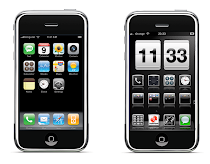
The final app I install after a jailbreak is known as winterboard. It's basically a skinning or theme app. Google it and you'll quickly discover that you don't need to be some sort of iClone. You can pretty much change the appearance of everything to suit yourself. There are off the shelf packages that will make loads of changes for you or, once you figure out how it's done, you can make changes yourself. The pic on the right in the ivolution image above is my phone as it presently looks. I downloaded a theme known as iElegance which gave me the background and changed some of my icons to the new look that you see. This theme had a clock and date function that I didn't like it so downloaded another theme called HTC springboard. I copied the files from the second theme and pasted them over the clock files from the first. I then searched google for iElegance type icons. There were loads of them and someone had even made a down loadable zip file so I downloaded this and set about altering my remaining icons. I removed the new folder icons by changing their file extensions and replaced them with new ones that matched my theme. Learning and doing took about three days.

The result shown above is exactly what I wanted. To be clear. If you had just wanted to transform your iPhone to look like an HTC there's a winterboard theme that will do that with weather and calender etc. What I wanted was the appearance of an HTC with the functionality of an iPhone. Thanks to jail breaking, Winterboard, theme developers and the dev-team that's exactly what I've got. If Apple allowed HTC to create an OS for their phone I doubt that it would look to much different. I prefer apples Icons and folders to HTCs menu bars but I prefer the HTC look. I've got it and it works.

In around two weeks there will be another apple update rumoured to be called 4.1. The upgrade will fix an issue with 3g reception. Will I upgrade? Yep. What I have done differently this time is that I have copied folders such as themes and jailbreak apps directly to my computer. My hope is that I can restore my jailbreak fully within 3 hours of an upgrade. If I can then it will be worth it.

Finally, for the most part the jailbreak community are pretty helpful. Loads of how to guides, loads of sites to help you keep up to date. I was surprised therefor with Modmyi.com. I posted three posts there as a newbie and did not get a single response. There was lots of help on the site but I think us newbies with our specific questions may be a bit simpleton for them.

Normal blog to follow and more of the 'iTry' next week.

Cheers
T


Tuesday, 15 June 2010

First bites at the apple.


So what's on my iPhone and why is it any better than any other phone?

Unlike most phones you have to do a bit of prep before your iPhone arrives. Why? Well it doesn't work without itunes. It's that simple. No iTunes no iPhone. As a windows user I had never had any need for iTunes. I therefor installed the minimum that I could and said 'no' to any prompts that asked if I wanted it to be a default player etc. I then set up an iStore account. I had no plans to purchase anything but never the less had to set up an account and supply bank details. iTunes then created a complete copy of all my music files (lucky I wasn't short of memory because it didn't ask, or warn me that this would happen). It wanted to copy all the pictures from my PC as well. And all the movies. I stopped it and limited what files it could access. Less attention to detail here could have caused all sorts of PC conflicts and problems.

The next thing I wanted to do before the phone arrived was sort out some satnav software. My last two phones had this and I strongly recommend it. Now, previously, I had acquired this software without paying. With Iphone I'd heard this might not work. A quick Internet search however explained to me that, I could have the software but, I would have to 'jailbreak' my phone first. Further searches told me that jail breaking would invalidate the warranty and that the phone would crash constantly. That and the fact that every software upgrade would undo the jailbreak. Hardly worthwhile then?

My new phone was jail broken within 12 hours of arrival. By 13 hours it had satnav and it worked. By 24 hours all that worked was the satnav and I'd lost my phone provider, wifi, etc. Maybe jail breaking didn't work. Restored the phone to default. Tried again. Hey presto! Almost two months now and no issues. Satnav works a treat.

Since my previous phones did SatNav I'm not going to rave about that although the rotating screen and large display are fantastic. Also my download is a later version than I had previously.

Apps:


Well being a true Scot I went for a look at some free stuff first. Two of my most used apps came from this initial start. Metro.co.uk a daily free British newspaper and STV news, a Scottish Television news application. Metro can also do a download if you're struggling for Internet. STV has all the headlines and provided you get 3g coverage can show bulletins at the same time.

My next fave is actually a website so you need to favorite it with safari. iphone.tvcatchup.com For users in the UK this should be essential. Basically all the digital free view channels live. What's more it actually manages to stream live TV with almost no Internet signal. The only time it's let me down so far has been the world cup. Not sure if it's the broadband signal or if the site gets over subscribed but otherwise it's excellent.

Then comes Stanza. An e-book reader with loads of free books. As a gadget lover I've always wondered if the Sony or amazon book readers were anything more than a gimmick. When I saw that this was free I thought I'd try it to see how it worked. Bloody hell! The sepia background, font, font size and spacing actually make it, not only possible but, pleasant to read on the small screen. Within the software there are links to download books direct to the phone or you can download them to your PC and use something like Box net to load them to your iPhone.

Box.net This I discovered because of Stanza above but it's important in it's own right. It's one of the ever popular 'cloud' services that let you save files from your PC to a web space, and download them to your phone or another PC from that space. Added to the mix it can read word, excel and pdf files on your iPhone.

AppBox Pro. Dubiously enough the only application I have paid for yet you can get it free. I discovered that some of the so called free apps come with loads of advertising so decided that 50 pence was a worthwhile investment to avoid the ads. This is just a collection of useful gizmo's that use the iPhone interface. Some like the day calculator, and unit converter are just a spreadsheet function created for you, others use updates when your phone is in wifi to get up to date info such as currencies. It's got a ruler, a spirit level, a torch (turns your screen bright white), it even has translation software. Available free or for the 50p premium without ads.

Yell.com. Just the yellow pages website but laid out in a way that suits the iPhone. Combine this with Google Earth/google maps and you've got a pretty powerful tool that will find your GPS location, find businesses near that location and even phone any of the numbers it finds with one touch rather than having to copy them down. It's actually like the adverts for the Iphone promise.

Wordweb and wikipanion provide an on/offline dictionary, thesaurus and encyclopedia and, importantly for me, use UK spelling.

The trainline.com is another online service that's been optimized to work well with iPhone. When you switch it on it can use your GPS location to find the nearest train station or you can manually enter details of the journey that you want to make.

I'm also using something called Fliq Notes. A nice straightforward software for keeping and categorising notes.

Nightstand is an alarm clock function which you probably don't need but which uses the HTC flip clock that my last phone had. It's free so why not.

Cinema Times (UK). The wife loves this and it works very well. For some reason they also do cinema times England, Wales, Scotland but just download the UK version. Set your fave cinema and it will get the latest listings from the net. Cool

I also have stopwatch and that mad program that can name any song, Shazam, as well as a version of spider solitaire. With the exception of the satnav and the 50p I paid for the premium version of AppBox all of the above were free.

In addition to this I have over 500 music files and forty or so photos. That and some paid for apps that I wont mention because I haven't paid for them. Try apptrakr.org if you want to know more.

A lot of these apps work using the Internet and/or the GPS. It's fair to say though that they download when the Internet is available but will still work when it isn't. The dictionary, book reader, newspaper etc can all work perfectly without a connection.

My old HTC touch could have done almost all of the above. It just didn't. The programs weren't in your face or as easy to access so you didn't find them. I believe that android is working to reverse this trend but, until then, it's an apple a day for me.


blogger templates